
What is an Addon Domain?
Addon domains allow you to control multiple domains from a single cPanel account. An addon domain links a new domain name to a subdirectory of your account’s home or public_html (document root) directory and then stores its files in that subdirectory.
Once an additional domain has been created, you can create email addresses and FTP accounts based on these new addresses.
How to create an addon domain in cPanel
Step 1. Login to your cPanel. The easiest way is to login to your Client Area, then open your cPanel.
Step 2. Once your cPanel is open, locate the Domains section and click on Domains.

Step 3. Click on the Create A New Domain button.
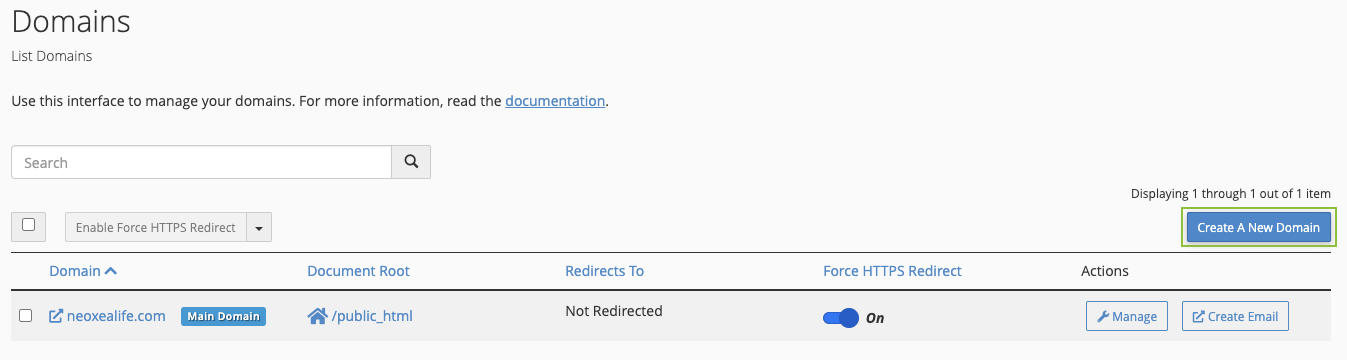
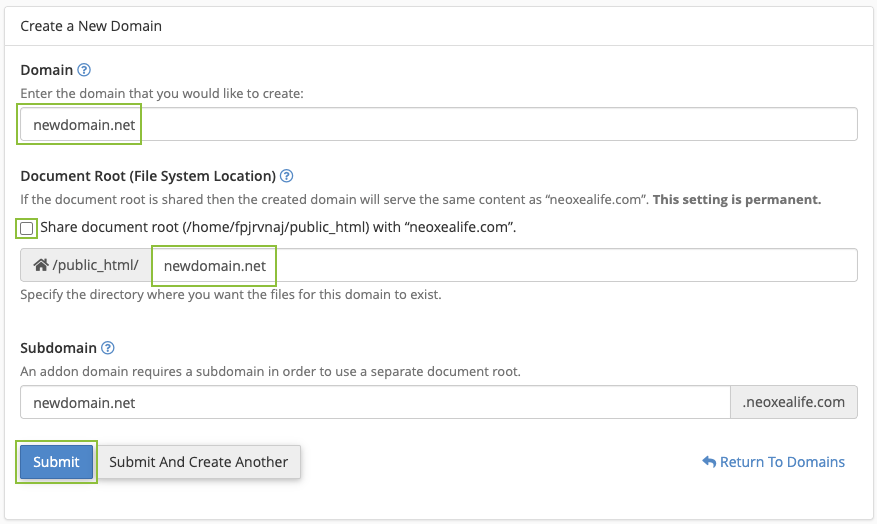
Step 4. Enter the following information:
- Domain: enter the addon domain that you want to add. In this example: newdomain.net
- Document root: leave the checkmark empty in order to enable the destination folder option.
- Home icon: choose the subdirectory for it in your account’s home directory (above public_html). This subdirectory will store your addon domain’s files and it’s where your website will be installed.
Hi Team it would be good to know also what to configure in the DNS of the added domain.
Thx a lot!
So it turned out, only the nameserver of teh domain need to be set to neoxea: https://neoxea.com/kb/topic/what-are-the-neoxea-dns/ – aparently after this is setup, also the ssl certficate is automatically installed via letsEncrypt.
Thank you!